Automating Container Updates with Renovate, Uptime Kuma, cron, and Ntfy!

Background
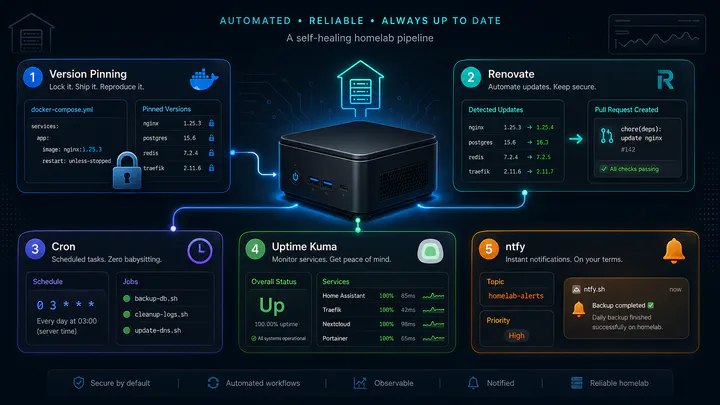
My list of self-hosted applications living out of big-dumpling have grown into the high tens as of writing. I have my highly regarded starr media server, as well as a plethora of other high productivity applications such as actual, grimmory, immich and the likes.
I leave my docker compose files for these applications floating pinned to ’latest’ releases of images so pulling images always gives me the latest images.
A few days ago, during one of my routine updates of my container applications, I pulled the latest image of Immich.
#/mnt/f15/docker-containers/immich/docker-compose.yml
name: immich
services:
  immich-server:
    container_name: immich_server
    image: ghcr.io/immich-app/immich-server:latest
    volumes:
      - ${UPLOAD_LOCATION}:/usr/src/app/upload
      - /etc/localtime:/etc/localtime:ro
    env_file:
      - .env
    ports:
      - '10001:2283'
    depends_on:
      - redis
      - database
    restart: "unless-stopped"

  database:
    container_name: immich_postgres
    image: docker.io/tensorchord/pgvecto-rs:pg14-v0.2.0
    environment:
      POSTGRES_PASSWORD: ${DB_PASSWORD}
      POSTGRES_USER: ${DB_USERNAME}
      POSTGRES_DB: ${DB_DATABASE_NAME}
      POSTGRES_INITDB_ARGS: '--data-checksums'
    volumes:
      - ${DB_DATA_LOCATION}:/var/lib/postgresql/data
    restart: "unless-stopped"
I do skim the Immich release notes for any breaking changes, because I consider Immich as a sort of tier 1 critical application, but nevertheless I failed to see the little notification regarding having to perform some database migration.

Pulling the new latest v3.0.3 version of Immich thus broke the application since Immich v3 dropped support for pgvecto.rs, but the old Compose file still deployed that database image. The application moved across a breaking compatibility boundary while its database dependency remained frozen. Immich’s v3 release specifically warned users about the dropped pgvecto.rs support and instructed them to move IMMICH_VERSION to the v3 line.
#Immich breaks and errors out
Initializing Immich v3.0.3
Starting api worker
Starting microservices worker
Error: No vector extension found.
Available extensions: vchord, vector
microservices worker exited with code 1
Killing api process
The fix for this was fortunately pretty simple, and doubly so with the assistance of ChatGPT to guide me through remediation. Furthermore, the extensive availability of backup images also reduced the risk of catastrophic data loss or corruption.
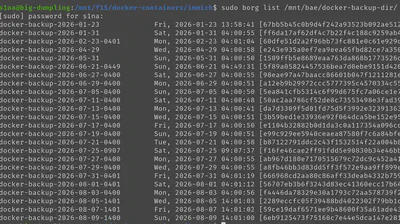
Nevertheless, this highlighted weaknesses in the way container images were being pulled and applications being updated in 2 ways:
- it involved tediously manually entering each application directory and pulling the latest container image; and
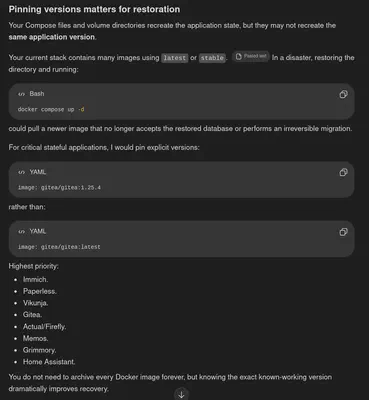
- not pinning versions could cause surprise breaking changes from latest images being pulled automatically, as I experienced with Immich.
The second point additionally is a sticking point and a known high risk item that has been identified and pointed out to me by ChatGPT on numerous occasions.
The Plan
In designing a new and improved system, our goal is to:
- Have an automated way of pulling the latest container images for each of our self-hosted applications without manual intervention.
- Archive the historical version currently running prior to updating the container image. This way we know the ’last known working version’ of the application (which would make recovery trivial, we just roll back to the last known working version!)
- Integrate updates with our existing backup process to make rolling back to the last known working version even more trivial with minimal to no data loss
- Implement downtime monitoring so we know when an update breaks the application and receive a notification immediately
Homelab dir structure
The relevant directory structure on big-dumpling is the following:
/mnt/f15/
    ├── ntfy
    │   ├── docker-compose.yml
    │   ├── config
    │   │   └── server.yml
    │   └── cache/
    ├── renovate
    │   └── docker-compose.yml
    ├── uptime-kuma
    │   ├── docker-compose.yml
    │   └── volumes/
    └── docker-containers
        ├── .gitignore
        ├── renovate.json
        ├── firefly
        │   ├── docker-compose.yml
        │   └── volumes/
        ├── immich
        │   ├── docker-compose.yml
        │   └── volumes/
        ├── grimmory
        │   ├── docker-compose.yml
        │   └── volumes/
        ├── gitea
        │   ├── docker-compose.yml
        │   └── volumes/
        └── other-hosted-applications...
            ├── docker-compose.yml
            └── volumes/
Part 1 Renovate
Renovate is an automated dependency-update tool that scans repositories for things like Docker image tags, packages, and GitHub Actions versions, then opens pull requests when newer versions are available. It gives us a controlled way to keep pinned dependencies current without relying on floating tags like ’latest’ or ‘release’
We will be integrating renovate with a self-hosted instance of Gitea to search for newly released versions of our applications and creating pull requests for newer versions.
We’ll need to create 2 new files in the /mnt/f15/docker-containers directory:
- .gitignore
- renovate.json
The docker-containers directory will now also be a git repo. Renovate will be monitoring this repo for newer versions of our applications.
# makes docker-containers a git repository
git init -b main
The only thing that will be included and recorded in our newly created repository will be the docker-compose.yml files. Git will ignore everything else.
#/mnt/f15/docker-containers/.gitignore
# Ignore everything by default
*

# Allow Git to traverse directories
!*/

# Track Docker Compose definitions
!**/compose.yml
!**/compose.yaml
!**/docker-compose.yml
!**/docker-compose.yaml

# Track repository configuration
!.gitignore
!renovate.json
!README.md

# Track deployment scripts later
!scripts/
!scripts/**

# Explicitly exclude secrets and runtime data
**/.env
**/.env.*
**/*.env
**/secrets/
**/volumes/
**/data/
**/database/
**/backups/
**/*.db
**/*.sqlite
**/*.sqlite3
**/*.pem
**/*.key
# testing to confirm only docker-compose.yml
# files are being tracked by git.
s1na@big-dumpling:/mnt/f15/docker-containers$ git status --short --untracked-files=all
?? .gitignore
?? actual-budget/docker-compose.yml
?? booklore/docker-compose.yml
?? dashy/docker-compose.yml
?? dokuwiki/docker-compose.yml
?? excalidraw/docker-compose.yml
?? file-browser/docker-compose.yml
?? firefly/docker-compose.yml
?? gitea/docker-compose.yml
?? home-assistant/docker-compose.yml
?? immich/docker-compose.yml
?? kitchenowl/docker-compose.yml
?? mealie/docker-compose.yml
?? memos/docker-compose.yml
?? miniflux/docker-compose.yml
?? omnitools/docker-compose.yml
?? paperless/docker-compose.yml
?? sparkyfitness/docker-compose.yml
?? trek/docker-compose.yml
?? vikunja/docker-compose.yml
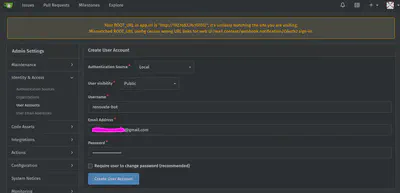
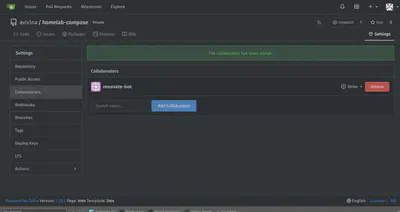
We will also need to create a Gitea Access Token for our renovate-bot account
Finally, we will need to set our configs in renovate.json
#/mnt/f15/docker-containers/renovate.json
{
  "$schema": "https://docs.renovatebot.com/renovate-schema.json",
  "enabledManagers": [
    "docker-compose"
  ],
  "dependencyDashboard": true,
  "timezone": "America/Edmonton",
  "minimumReleaseAge": "14 days",
  "minimumReleaseAgeBehaviour": "timestamp-optional",
  "automerge": true,
  "ignoreTests": true,
  "prHourlyLimit": 0,
  "prConcurrentLimit": 0,
  "commitHourlyLimit": 0,

  "packageRules": [
    {
      "description": "Label Docker major updates",
      "matchManagers": [
        "docker-compose"
      ],
      "matchUpdateTypes": [
        "major"
      ],
      "addLabels": [
        "major-update",
        "manual-review"
      ]
    },
    {
      "description": "Label Docker minor and patch updates",
      "matchManagers": [
        "docker-compose"
      ],
      "matchUpdateTypes": [
        "minor",
        "patch"
      ],
      "addLabels": [
        "container-update"
      ]
    },
    {
      "description": "Disable database major-version updates",
      "matchManagers": [
        "docker-compose"
      ],
      "matchDatasources": [
        "docker"
      ],
      "matchPackageNames": [
        "/(^|\\/)(postgres|mariadb|redis)$/"
      ],
      "matchUpdateTypes": [
        "major"
      ],
      "enabled": false
    }
  ]
}
Of key interests are the following configs:
"minimumReleaseAge": "14 days",
"minimumReleaseAgeBehaviour": "timestamp-optional",
We want latest versions that are at minimum 14 days old. Sometimes images come with a timestamp allowing renovate to easily identify this, sometimes images do not have a timestamp. If there is no timestamp, then renovate will count the 14 days from the time it first sees the new version.
"automerge": true,
We want renovate to automatically update our gitea repo and have all docker-compose.yml files on it pinned to the latest version
"ignoreTests": true,
Renovate also apparently seems to expect some sort of CI testing and status checks, which we will not be implementing. Hence this setting tells renovate that there are no automated tests to wait for and to allow automerging of the changes to the docker-compose.yml files.
We also disable database major updates as those are highly dangerous and tend to require a manual migration. For the most part, applications tend to stick to a DB version and if a migration is required, that is a bridge we will have to cross when the time comes.
Once these files are committed to the repo and sent to Gitea, we can then run a quick sanity test
#Test renovate
docker run --rm \
  --network gitea_default \
  -e RENOVATE_PLATFORM=gitea \
  -e RENOVATE_ENDPOINT="http://gitea:3000/api/v1" \
  -e RENOVATE_REPOSITORIES="s1na/homelab-compose" \
  -e RENOVATE_DRY_RUN=full \
  -e LOG_LEVEL=debug \
  ghcr.io/renovatebot/renovate:44.7.2
We will then need convert this Dockerfile into a docker-compose.yml for renovate, because I just like docker-compose.yml files, and we will also need to create a cronjob to run this renovate docker-compose.yml file every so often to scan for new versions of our self-hosted applications.
#/mnt/f15/renovate/docker-compose.yml
services:
  renovate:
    image: ghcr.io/renovatebot/renovate:44.7.2
    environment:
      RENOVATE_PLATFORM: gitea
      RENOVATE_ENDPOINT: http://gitea:3000/api/v1
      RENOVATE_REPOSITORIES: avis1na/homelab-compose
      LOG_LEVEL: info
    networks:
      - gitea
    restart: "no"

networks:
  gitea:
    external: true
    name: gitea_gitea
# runs every monday at 4:00 AM MST.
0 4 * * 1 cd /mnt/f15/renovate && /usr/bin/docker compose run --rm -T renovate >> /var/log/renovate.log 2>&1
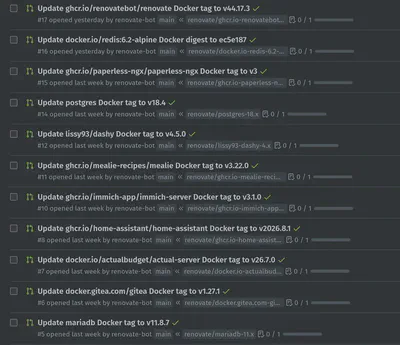
Now this still doesn’t update our containers just yet, this only updates the docker-compose.yml files on Gitea with the latest version. There is still some work required to pull these updated docker-compose.yml files and then use these docker-compose.yml files to pull the latest docker images.
Part 2 Uptime Kuma
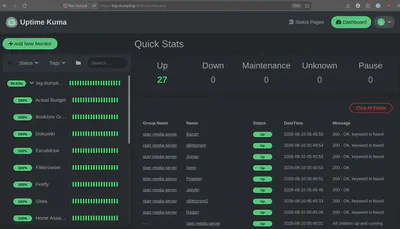
Uptime Kuma is a self-hosted monitoring tool that continuously checks whether your websites, containers, APIs, ports, or other services are reachable and healthy, then alerts you when something goes down or starts failing. It’s essentially a simple homelab status monitor and notification system.
services:
  uptime-kuma:
    image: louislam/uptime-kuma:2
    container_name: uptime-kuma
    restart: always
    ports:
      - "10704:3001"
    volumes:
      - ./volumes/data:/app/data
    environment:
      - TZ=America/Edmonton
      - UMASK=0022
    networks:
      - kuma_network

networks:
  kuma_network:
    driver: bridge
We’ll need to set up monitors for each of our applications. Here I’m using the HTTP keyword monitor type, essentially Uptime Kuma requests the app’s home webpage and looks for a keyword, if it find the keyword, then the application must be up, else it is marked as down.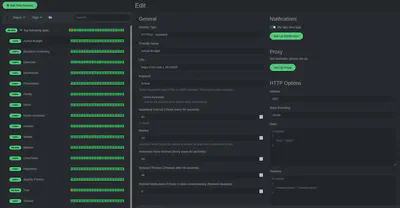
We will then also leverage our existing Ntfy instance to trigger an email notification if Uptime Kuma detects any of our applications are down or otherwise unavailable.
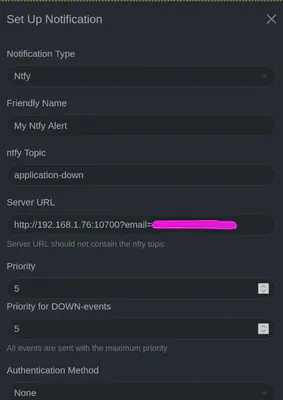
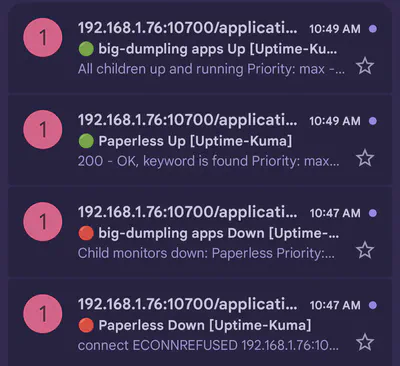
Now we have notifications to let us know if a update has failed causing one or multiple of our applications to become unavailable. We also have a system (Gitea) that archives and records known last working versions of applications. Lastly we also have a system of backups allowing for rapid disaster recovery with virtually no loss of data should a renovate update fail. The last step is putting all this together.
Part 3 Pulling the latest docker-compose.yml files
Now that renovate is monitoring our applications for latest image versions on a weekly basis and automerging any new versions older than 14 days directly to Gitea, the last step is for us to pull these newer versions and then updating each of our applications. We will do so with a shell script heavily influenced by our existing backup scripts.
The following script takes a full backup snapshot, then pulls the latest application docker-compose.yml from Gitea containing the newly updated image versions. It then runs:
docker compose up -d
to pull that new version of the docker image for each of the applications inside our docker-containers directory
#!/bin/bash

# Define variables
DOCKER_CONTAINERS_DIR='/mnt/f15/docker-containers'
BACKUP_SCRIPT="/mnt/f15/desktop/backup-scripts/docker_backup_script.sh.offsite"
LOG_FILE="/var/log/docker-updates.log"
GIT_USER="s1na"
GIT_REMOTE="local"
GIT_BRANCH="main"

# Function to send email via ntfy
send_email() {
    local subject=$1
    local message=$2
    curl \
        -H "Email: <my gmail email>" \
        -H "Tags: cd" \
        -d "$subject $message" \
         http://192.168.1.76:10700/docker-app-updates
}


# Log function
log() {
    echo "$(date '+%Y-%m-%d %H:%M:%S') - $1" | sudo tee -a "$LOG_FILE" > /dev/null
}

# Start script
log "Docker application updates process started."

# Check if backup directory exists
if [ ! -d "$DOCKER_CONTAINERS_DIR" ]; then
    log "Docker-containers directory $DOCKER_CONTAINERS_DIR does not exist."
    send_email "Docker Application Updates Failed" "Docker-containers directory $DOCKER_CONTAINERS_DIR does not exist."
    exit 1
fi

# Running pre-update backup
log "Running pre-update backup"

if ! "$BACKUP_SCRIPT"; then
    log "Pre-update backup failed"
    send_email "Docker Application Updates Failed" "Pre-update backup failed"
    exit 1
else
    log "Pre-update backup complete"
fi

# Git pulling the latest docker-compose.yml files
log "Pulling git changes into $DOCKER_CONTAINERS_DIR"

if sudo -H -u "$GIT_USER" env GIT_TERMINAL_PROMPT=0 git -C "$DOCKER_CONTAINERS_DIR" pull --ff-only "$GIT_REMOTE" "$GIT_BRANCH"; then
    log "Git pull successful"
else
    log "Git pull unsucessful"
    send_email "Docker Application Updates Failed" "Git pull was NOT successful"
    exit 1
fi

# Running docker compose config checks
log "Running docker compose config checks"
for app_dir in "$DOCKER_CONTAINERS_DIR"/*; do
    if [ -d "$app_dir" ] && [ -f "$app_dir/docker-compose.yml" ]; then
        log "Running docker-compose.yml config checks for: $app_dir"

        # Change to the app directory
        cd "$app_dir" || {
            log "Failed to change directory to $app_dir";
            send_email "Docker Application Updates Failed" "Failed to change dir while trying to check configs for $app_dir during the app update process"
            exit 1;
        }

        if sudo docker compose -f docker-compose.yml config --quiet; then
            log "docker-compose.yml for app $app_dir successfully verified."
        else
            log "docker-compose.yml verification failed for $app_dir."
            send_email "Docker Application Updates Failed" "Failed docker-compose verification for $app_dir."
            exit 1
        fi
    fi
done

# Running docker app updates
log "Running docker app updates"
for app_dir in "$DOCKER_CONTAINERS_DIR"/*; do
    if [ -d "$app_dir" ] && [ -f "$app_dir/docker-compose.yml" ]; then
        log "Running docker compose up -d for: $app_dir"

        # Change to the app directory
        cd "$app_dir" || {
            log "Failed to change directory to $app_dir";
            send_email "Docker Application Updates Failed" "Failed to change dir while trying to check configs for $app_dir during the app update process"
            exit 1;
        }

        if sudo docker compose up -d; then
            log "Containers for app $app_dir restarted successfully."
        else
            log "Failed to restart containers for app $app_dir."
            send_email "Docker Application Updates Failed" "Failed to docker compose up -d containers in $app_dir."
            exit 1
        fi
    fi
done


log "Docker app updates completed successfully."
send_email "Docker App Updates Successful" "Docker apps updated successfully. See log for details: $LOG_FILE"
exit 0
We then create a cronjob to run this script monthly
# script runs the docker update on the 2nd of every month
0 14 2 * * /mnt/f15/desktop/backup-scripts/docker_updates.sh
Conclusion
This system, I believe is a robust architecture allowing for automated updates of our self-hosted applications as well as rapid detection of failed updates and allows easy rollback to the last known good state with no loss of data.
Currently in this implementation, any disaster recovery and rollback to a previous known good state is manual. I only get email notifications that an application is unavailable from a ntfy email notification and then must manually perform the rollback as described in my previous post using borg to restore the backup snapshot to the last known good version of the container image.
An arguement can be made that this disaster recovery rollback operation should be automated, and perhaps that is something that can be investigated in future, but for now I believe we are at an acceptable point where these update failures of the likes we experienced with the recent Immichv3 should be few and far between, and even then, recovery from such outages should be, if tedious and manual, at least should also be trivial to recover from.